 Preparing SCSI Hard-Disk Drives for Installation
Installing a Dell PowerEdge Expandable RAID Controller Host Adapter Card
Dell™ PowerEdge™ 2550 Systems Installation and Troubleshooting Guide
|
|
|
This section describes how to install and configure small computer system interface (SCSI) hard-disk drives in the system's internal hard-disk drive bays. Instructions are also included for upgrading the system by installing an optional SCSI backplane daughter card for split backplane operation or a Dell™ PowerEdge™ Expandable RAID Controller (PERC) host adapter card.
The hard-disk drive bays provide space for up to four 1-inch hard-disk drives. (You can also install a fifth hard-disk drive in the peripheral bay by purchasing an upgrade kit from Dell. For installation information, see the documentation provided with the upgrade kit.)
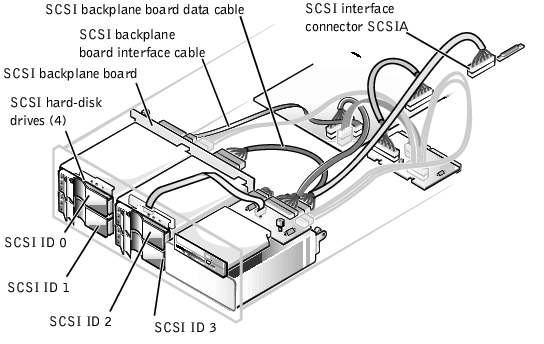
Figure 10-1 illustrates the system components associated with the SCSI hard-disk drives.
Figure 10-1. Hard-Disk Drive Hardware
 |
NOTE: Dell recommends that you use only drives that Dell has tested and approved for use with the SCSI backplane board. |
The SCSI drives must be configured as follows:
You may need to use programs other than those provided with the operating system to partition and format SCSI hard-disk drives. See "Installing and Configuring SCSI Drivers" in the User's Guide for information and instructions.
 |
NOTICE: Do not turn off or reboot your system while the drive is being formatted. Turning off or rebooting your system while the drive is being formatted can cause a drive failure. |
When you format a high-capacity SCSI hard-disk drive, be sure to allow enough time for the formatting to complete. Long formatting times for these drives are normal.
The four connectors on the SCSI backplane board are designated as SCSI ID 0 through SCSI ID 3 (see Figure 10-1). If a fifth hard-disk drive is installed in the peripheral bay, it is identified as SCSI ID 4.
To operate the backplane in a 1 x 4 configuration, attach a single host adapter to connector SCSIA on the backplane board (see Figure A-4 in "Jumpers, Switches, and Connectors"). You can operate the SCSI backplane board in a split 2 x 2 mode if a second, optional SCSI backplane daughter card is installed (see "Installing a SCSI Backplane Daughter Card"). In split mode, a host adapter attached to connector SCSIB on the backplane controls slots SCSI 0 and SCSI 1, while the host adapter connected to SCSIA controls slots SCSI 2, SCSI 3, and the fifth drive slot, SCSI 4 (if installed).
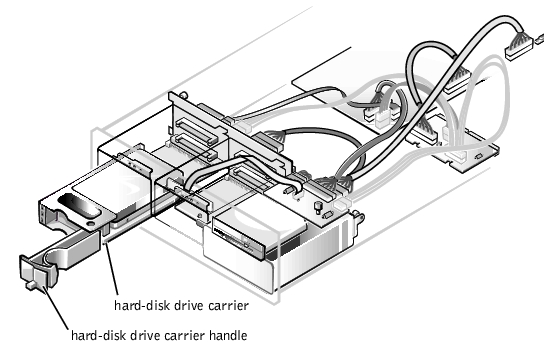
SCSI hard-disk drives are supplied by Dell in special drive carriers that fit in the hard-disk drive bays. To install a SCSI hard-disk drive, perform the following steps.
|
NOTICE: Hot-plug drive installation is not supported for systems without an integrated redundant array of independent disks (RAID) controller or Dell PERC host adapter card. |
Figure 10-2. Removing a Hard-Disk Drive Lock
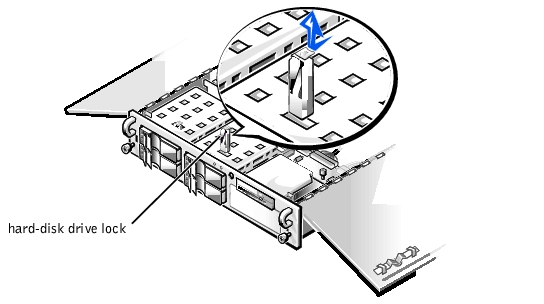
Figure 10-3. SCSI Hard-Disk Drive Carrier
Follow these general guidelines when you install a Dell host adapter card. For specific instructions, refer to the documentation supplied with the PERC host adapter card.
 |
WARNING: Before you install the host adapter card, you must turn off the system and disconnect it from the electrical outlet. For more information, see "Safety First—For You and Your Computer" in "Checking Inside the System." |
|
WARNING: See "Protecting Against Electrostatic Discharge" in the safety instructions in the System Information document. |
For each external device, plug the socket end of the power cable into the power receptacle on the back of the device, and plug the other end of the power cable into an electrical outlet.
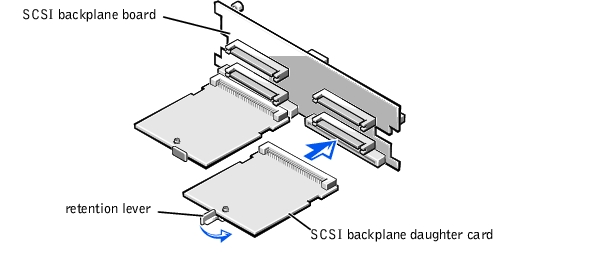
To operate the SCSI backplane in a 2 x 2 split backplane configuration, you must install a second, optional daughter card. To install the daughter card, perform the following steps.
|
WARNING: Before you install the daughter card, you must turn off the system and disconnect it from the electrical outlet. For more information, see "Safety First—For You and Your Computer" in "Checking Inside the System." |
|
WARNING: See "Protecting Against Electrostatic Discharge" in the safety instructions in the System Information document. |
|
NOTICE: You must remove all hard-disk drives to avoid damaging the SCSI backplane board when you remove it later in this procedure. |
Figure 10-4. Installing a Daughter Card
|
NOTICE: Ensure that the two connectors are aligned before proceeding. |
- Slide the daughter card into the drive bay and align the connector on the card with the corresponding connector on the backplane.
- Lock the card into place by closing the retention lever on the card's front edge (see Figure 10-4).
To configure the drives in a split 2 x 2 configuration (or 1 x 2 and 1 x 3 in a five-drive system), you must connect two SCSI channels to the SCSI backplane board. The channel attached to connector SCSIB on the backplane board controls slots SCSI ID 0 and SCSI ID 1, while the channel connector to connector SCSIA controls slots SCSI ID 2, SCSI ID 3, and the fifth drive slot (if installed), SCSI ID 4 (see Figure 10-1).
If you plan to boot the system from a hard-disk drive, the drive must be attached to the primary (or boot) controller or SCSI host adapter card. You can select the primary controller using the System Setup program. See "Using the System Setup Program" in the User's Guide for instructions.