 PC Card Types
Dell™ Latitude™ D610 User's Guide
See "Specifications" for information on supported PC Cards.

|
NOTE: A PC Card is not a bootable device. |
The PC Card slot has one connector that supports a single Type I or Type II card. The PC Card slot supports CardBus technology and extended PC Cards. "Type" of card refers to its thickness, not its functionality.
Your computer shipped with a plastic blank installed in the PC Card slot. Blanks protect unused slots from dust and other particles. Save the blank for use when no PC Card is installed in the slot; blanks from other computers may not fit your computer.
To remove the blank, see "Removing a PC Card or Blank."
An extended PC Card (for example, a wireless network adapter) is longer than a standard PC Card and extends outside the computer. Follow these precautions when using extended PC Cards:
You can install a PC Card in the computer while the computer is running. The computer automatically detects the card.
PC Cards are generally marked with a symbol (such as a triangle or an arrow) to indicate which end to insert into the slot. The cards are keyed to prevent incorrect insertion. If card orientation is not clear, see the documentation that came with the card.

|
CAUTION: Before you begin any of the procedures in this section, follow the safety instructions in the Product Information Guide. |
To install a PC Card:
If you encounter too much resistance, do not force the card. Check the card orientation and try again.
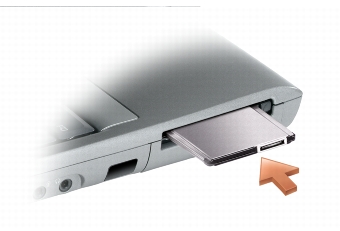
The computer recognizes most PC Cards and automatically loads the appropriate device driver. If the configuration program tells you to load the manufacturer's drivers, use the floppy or CD that came with the PC Card.

|
NOTICE: Use the PC Card configuration utility (click the  icon in the taskbar) to select a card and stop it from functioning before you remove it from the computer. If you do not stop the card in the configuration utility, you could lose data. Do not attempt to eject a card by pulling its cable, if one is attached.
 |
|
|
CAUTION: Before you begin any of the procedures in this section, follow the safety instructions in the Product Information Guide. |
|
|
NOTE: This computer uses digital sound, and contains no analog audio lines. PCMCIA cards such as modems that use analog lines to produce sound will not function. |
Save a blank to use when no PC Card is installed in a slot. Blanks protect unused slots from dust and other particles.
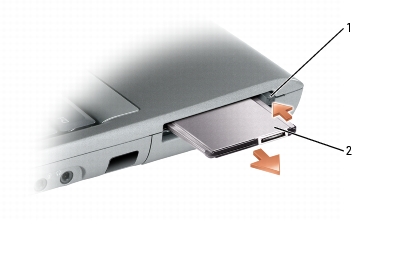
|
1 |
eject button |
|
2 |
PC card |