Manuals

Manuals
Memory: Dell OptiPlex GX50 Systems

Back to Contents Page

Memory

Dell™ OptiPlex™ GX50 Systems

  Removing a Memory Module

  Replacing a Memory Module


Removing a Memory Module

CAUTION: Use a wrist-grounding strap as explained in "Precautionary Measures."
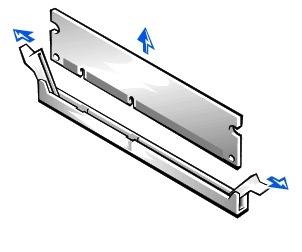
  1. Press the securing clips outward simultaneously until the memory module disengages and pops out slightly from the socket.

Removing the Memory Module

  1. Lift the module away from the socket.


Replacing a Memory Module

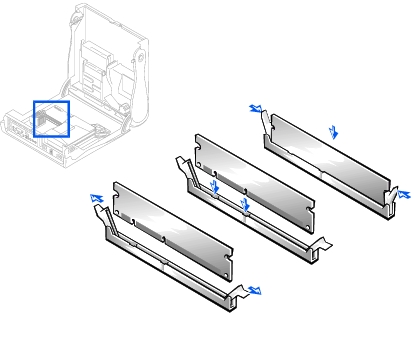
NOTICE: To avoid damage to the memory module, press the module straight down into the socket with equal force applied at each end of the module.
  1. Insert the module straight down into the connector, ensuring that it fits into the vertical guides at each end of the connector. Press firmly on the ends of the module until it snaps into place.

Replacing a Memory Module


Back to Contents Page


Copyright 1999-2007 Dell Inc.
Battery Recall | About Dell | Conditions of Sale & Site Terms | Unresolved Issues | NEW Privacy Policy | Contact Us | Site Map | Feedback

Top
Large Text
sn AP28